A PAK file is a game archive - a single container holding many of a game's assets, such as textures, models, audio and scripts. There is no universal PAK format: Quake-engine games, Unreal Engine titles and Baldur's Gate 3 all use the .pak extension for different container structures, so the right tool depends on which game the file came from.
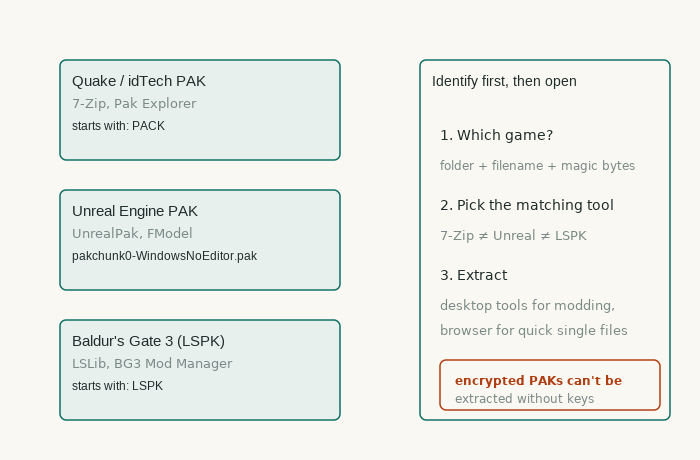
PAK is a family of formats: identify the game first, then pick the tool.
What a PAK file is
A PAK file is an archive, like a ZIP or RAR, but built for game data. Games ship thousands of individual assets - textures, 3D models, audio files, scripts, level data - and shipping them as loose files would be slow to read and easy to tamper with. Instead, the engine packs them into one or more PAK files that the game reads directly.
The name "PAK" is short for package, and the format has been around since the early days of PC gaming. id Software's Quake used PAK files in 1996, and the extension has been reused by many engines since. That reuse is the source of most confusion: the .pak extension does not identify one format, it identifies a family of formats that share a name.
PAK archives have been packing game assets since the arcade era. Photo by Justin Elliott, CC BY 2.0.
The size of PAK files varies enormously with the game. A small indie game might ship a single 50 MB PAK; a modern AAA title ships dozens of PAKs totalling tens of gigabytes. The larger the game, the more likely its PAKs are split into chunks - which is why you will often see numbered or named PAK files in a game's folder rather than one big archive.
Why PAK is not a single format
This is the most important thing to understand about PAK files: the extension tells you almost nothing by itself. At least three major, incompatible container formats use it:
There are more - Source engine games, some MMOs, and various indie engines use .pak for their own containers. The practical rule: identify the game first, then pick the tool for that game's variant. A tool that opens one PAK type will usually fail on another, and that is normal, not a bug.
This is also why "PAK viewer" as a single product is a trap: any tool that claims to open every .pak file is either lying or extremely limited. The honest tools name the variants they support, and the honest guides - like this one - tell you to identify the game before choosing a tool.
- Quake / idTech PAK. The original, used by Quake, Quake II, Quake III Arena and other idTech games. A simple archive of files with a directory at the end. 7-Zip opens these.
- Unreal Engine PAK. Used by Unreal Engine 3 and 4 games (and many others). A more complex container with its own index and optional encryption. Unreal's own tools, or specialized extractors, handle these.
- Baldur's Gate 3 PAK (LSPK). Larian Studios' own container format, used by BG3 and other Larian games. It is not an Unreal PAK and not a Quake PAK; it needs Larian-specific tools.
Identifying which game your PAK came from
Before you can open a PAK, you need to know which game it belongs to. Three quick checks:
1. The folder it came from. PAK files usually sit in a game's install directory, often in a paks or pak0 folder. The surrounding files - the game's executable, other PAKs with the game's name - tell you the engine.
2. The filename. Quake's archives are named pak0.pak, pak1.pak and so on. Unreal games use names like pakchunk0-WindowsNoEditor.pak. Baldur's Gate 3 uses names like Gustav.pak or Shared.pak. The naming pattern is a strong hint.
3. The file's first bytes. Open the file in a hex viewer. Quake PAKs start with the ASCII text PACK. Unreal PAKs start with a version number and a magic value. LSPK files start with the text LSPK. A quick look at the header settles it.
If you are still unsure, search the filename online - modding communities have documented which tool opens which archive for virtually every game.
A quick note on the hex check: you do not need a dedicated hex editor. Any text editor that can open binary files, or a command-line tool like xxd on Linux and macOS, will show the first bytes. On Windows, Notepad will show the readable ASCII characters at the start of the file even if the rest is binary noise - enough to spot PACK or LSPK.
Opening a Quake or idTech PAK
Quake-family PAKs are the simplest variant, and they are the one case where a general-purpose tool works.
With 7-Zip. 7-Zip opens Quake PAK files directly. Right-click the file, choose "Extract here" or "Extract to...", and 7-Zip unpacks the contents. This works for Quake, Quake II, Quake III Arena and other games using the same container.
With a dedicated tool. Pak Explorer and similar small utilities exist specifically for browsing and extracting Quake PAKs, with a nicer interface for previewing textures and sounds.
The honest caveat: 7-Zip handles the Quake/idTech variant, but it does not open every .pak file. If 7-Zip reports the file as unsupported, the file is a different variant - move on to the engine-specific tools below rather than assuming the file is corrupt.
Opening an Unreal Engine PAK
Unreal Engine PAKs are more complex, and general-purpose archivers do not open them. The standard tools:
UnrealPak. The official extractor ships with Unreal Engine itself. If you have the engine installed, UnrealPak.exe <file>.pak -Extract <output folder> extracts the archive. This is the most reliable method for Unreal 3 and 4 games.
FModel. The community-standard tool for browsing and extracting Unreal Engine 4 and 5 game files. It reads the archive index, shows the file tree, and can export individual assets. Most modding communities use FModel.
UnrealPakTool and similar. Standalone builds of UnrealPak for specific engine versions are widely shared in modding communities, for people who do not have the full engine installed.
A note on encryption: some Unreal games encrypt their PAK files. An encrypted PAK cannot be extracted without the game's decryption keys, and the tools will report an error. This is a deliberate protection, not a tool failure.
If you hit an encrypted PAK, the practical options are limited: check whether the modding community for that game has published a key or a workaround, or accept that the archive is not meant to be extracted. Most games do not encrypt their PAKs - encryption is the exception, mostly on newer titles with anti-tamper concerns.
Opening a Baldur's Gate 3 PAK
Baldur's Gate 3 uses Larian's LSPK container, which is different from both Quake and Unreal PAKs. The tools:
BG3 Mod Manager. The standard tool for the BG3 modding community. It installs and manages mods, and it can extract PAK contents.
LSLib (the "BG3 Multitool"). Larian's own toolkit for working with BG3 data files. It opens LSPK archives, converts between formats, and is the tool the modding community builds on.
7-Zip does not open LSPK files. This is a common point of confusion - people try 7-Zip on a BG3 PAK, get an error, and assume the file is broken. It is not; it is a different format that needs Larian's tools.
Browser-based extraction
If you have a PAK from a supported variant and you want to extract a file or two without installing anything, a browser-based extractor can do the job. FileViewerHub's planned PAK viewer will list the archive's contents as a browsable tree - every entry with its path and size - and let you extract individual files or the whole archive, entirely on your device. Nothing is uploaded. (Once the tool ships, you will be able to extract a PAK in your browser directly.)
The honest limitation: browser extraction supports the common variants (Quake/idTech PAK, Unreal PAK, and BG3's LSPK), and it cannot handle encrypted archives. If the tool reports an unsupported variant, it will say so and name what it does support, rather than failing silently.
For a full modding workflow - extracting hundreds of assets, repacking, testing in-game - the desktop tools above remain the right choice. Browser extraction is for the quick job: one file out of an archive, no software installed.
A note on game assets and licensing
Extracting game assets is a normal part of modding, and it is worth being clear about the line between fine and not fine.
Extracting assets for personal use - learning how a game is built, making a mod for your own game, studying a texture or model - is generally accepted practice in the modding community, and most game studios tolerate or encourage it.
Redistributing extracted assets - uploading them, selling them, or shipping them inside your own project - is a different matter. Game assets are copyrighted, and their licenses usually prohibit redistribution. A mod that includes assets from another game can get you in trouble with the studio and with mod platforms.
The practical rule: extract for yourself, credit and follow the license when you share anything, and never sell or repackage another game's assets. When in doubt, the game's EULA and the modding community's rules for that specific game are the authority.
One more distinction that matters in practice: extracting assets to learn from them (studying how a texture is built, how a model is rigged) is different from extracting them to ship them. The first is how a generation of game developers learned their craft. The second is where the legal risk lives. Keep the two separate and you will stay on the right side of the line.
FAQ
What is a PAK file?
A PAK file is a game archive - a single container holding many of a game's assets, such as textures, models, audio and scripts. The .pak extension is used by several different container formats, so the right tool depends on the game.
Can 7-Zip open PAK files?
7-Zip opens Quake/idTech PAK files directly. It does not open Unreal Engine PAKs or Baldur's Gate 3 LSPK files - those need engine-specific tools.
How do I know which game a PAK file is from?
Check the folder it came from, the filename pattern (pak0.pak for Quake, pakchunk0-WindowsNoEditor.pak for Unreal, Gustav.pak for BG3), and the file's first bytes in a hex viewer (PACK for Quake, LSPK for BG3).
Is it legal to extract game assets?
Extracting assets for personal use and modding is generally accepted. Redistributing, selling, or shipping another game's assets in your own project is usually prohibited by copyright and the game's license.
What is QuickBMS?
QuickBMS is a universal archive extractor with scripts for many game formats, including several PAK variants. It is powerful but script-based, so it is aimed at users comfortable with command-line tools.
Can I repack a PAK file after editing?
For some variants, yes - UnrealPak can repack Unreal PAKs, and LSLib can repack LSPK files. Quake PAKs can be repacked with simple tools. Repacking is how mods are distributed for many games.
Want more file-format guides? Browse all FileViewerHub guides - practical answers, no jargon.