GGUF is the file format used to distribute quantised large language models for local inference - it is what llama.cpp, Ollama and LM Studio load. A single GGUF file contains the model weights plus all the metadata needed to run it: architecture, tokeniser, context length and quantisation type. It replaced the older GGML format in 2023.
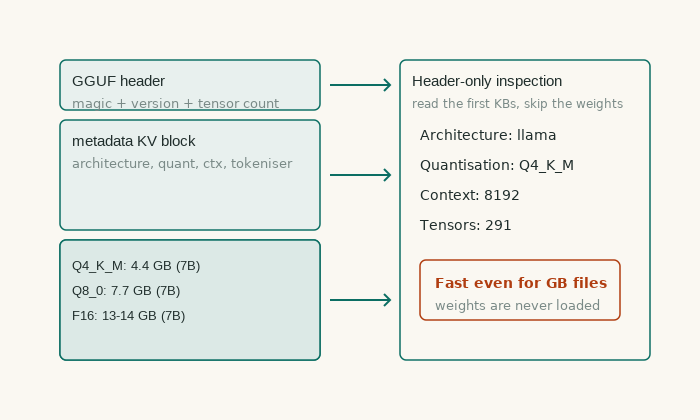
A GGUF file is self-describing: header and metadata come first, tensor data last.
What GGUF is and what it replaced
GGUF stands for GPT-Generated Unified Format. It was created by the llama.cpp project as the standard container for running large language models locally, and it is now the de-facto format for local inference across llama.cpp, Ollama, LM Studio and GPT4All.
Before GGUF there was GGML, the format that made local LLMs practical in the first place. GGML worked, but it had a structural problem: every new model architecture required changes to the format itself, and the format carried no metadata about the model. A file did not tell you what architecture it was, what tokeniser it used, or what context length it supported. You had to know those things in advance.
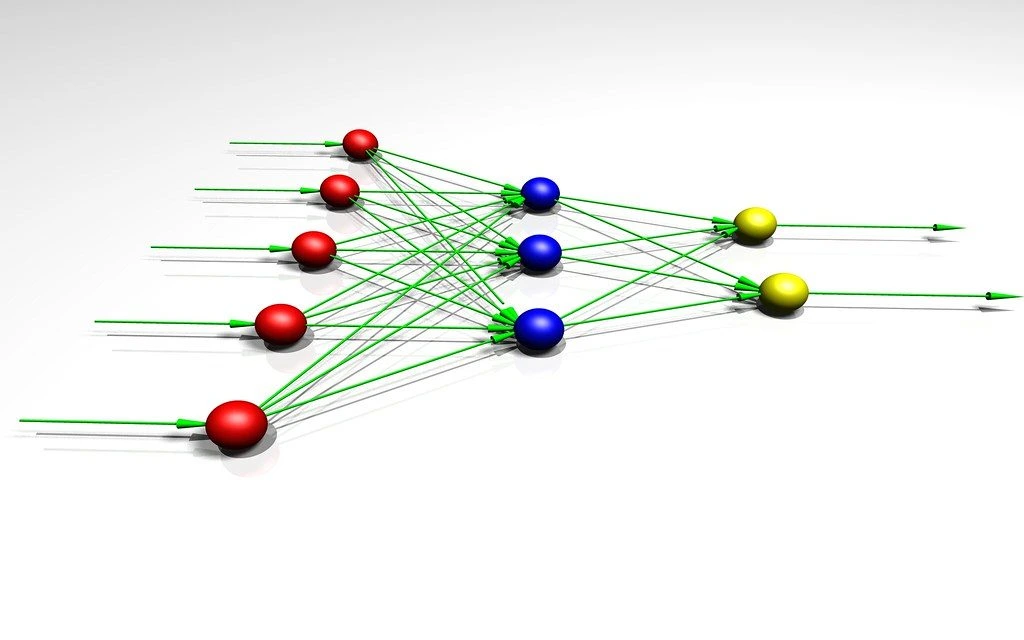
A GGUF file packages the weights and metadata of a neural network like this one for local inference. Photo by fdecomite, CC BY 2.0.
GGUF fixed that by making the file self-describing. The format has a versioned header and a metadata section that records everything the runtime needs: the architecture, the tokeniser type and vocabulary, the context length, the quantisation type, and the tensor layout. A GGUF file is a complete, portable model package. The llama.cpp project introduced GGUF in August 2023 and deprecated GGML shortly after; by late 2023 the ecosystem had moved over.
The practical consequence of the switch is visible everywhere today: when you pull a model in Ollama or download one from Hugging Face for local use, the file you get is a GGUF. The format's version field (currently version 3) lets the project evolve the format without breaking older files, and the metadata block means a runtime can validate a file before loading a single weight.
What is inside a GGUF file
A GGUF file has three parts, in order:
The key practical point: the metadata block is at the front of the file, and the tensor data is at the back. A tool that only wants to know what a model is - architecture, quantisation, context length - can read the first few kilobytes and ignore the gigabytes of weights behind them. That is why header-only inspection is fast even for multi-gigabyte files.
The metadata block also explains why GGUF files are so portable. The tokeniser vocabulary, the special tokens, the layer counts and the attention configuration are all inside the file. Two different runtimes loading the same GGUF will produce the same model behaviour, because nothing about the model's definition is left to guesswork.
- The header. A magic number (
GGUF), a format version, and the tensor count. The version field is what lets the format evolve without breaking older files. - The metadata key-value block. A list of typed key-value pairs describing the model: architecture name (for example
llamaorqwen2), tokeniser type, context length, block count, embedding dimensions, and the quantisation type. This block is what makes the file self-describing. - The tensor data. The actual weights, stored in the order and precision the metadata describes. For a quantised model, this is where the compressed weights live.
GGUF vs safetensors: when each is used
Safetensors is the other major format for distributing model weights, and the two are often confused because both are single-file containers for neural network weights.
| GGUF | Safetensors | |
|---|---|---|
| Made for | Local inference (llama.cpp, Ollama, LM Studio) | Training and inference in the PyTorch ecosystem (Hugging Face Transformers) |
| Weights | Usually quantised (4-bit, 5-bit, 8-bit) | Usually full precision (FP16, BF16, FP32) |
| Metadata | Rich, self-describing header | Minimal; model config lives in separate JSON files |
| Typical size (7B model) | 4-8 GB depending on quantisation | ~14 GB at FP16 |
| Who loads it | llama.cpp, Ollama, LM Studio, GPT4All | PyTorch, Transformers, Diffusers, vLLM |
The practical difference: if you are running a model locally with Ollama or LM Studio, you want GGUF. If you are fine-tuning, training, or running a model through Python with Transformers, you want safetensors.
The two formats are not competitors in the same niche - they serve different stages of a model's life. Hugging Face hosts both for most popular models, and conversion between them is routine. The convert_hf_to_gguf.py script in llama.cpp converts safetensors to GGUF, and the reverse is possible with tools like gguf-to-torch.
There is one more difference worth knowing: safetensors was designed with a safety goal in mind - its header format prevents the arbitrary code execution that was possible with pickle-based PyTorch checkpoints. GGUF's design goal was different: a complete, self-describing package for inference. Both are safe to load in their intended runtimes, and neither should be loaded from untrusted sources without care.
Quantisation types explained (Q4_K_M, Q5_K_S, Q8_0)
Quantisation is the process of storing weights at lower precision to shrink the file and the memory footprint. A full-precision 7B model at FP16 weighs about 13-14 GB. Quantised versions of the same model fit in 4-8 GB, at the cost of a small quality loss.
The naming convention is: Q (quantised) + bits per weight + K (K-quant family) + size variant (S = small, M = medium, L = large). K-quants, introduced in llama.cpp in 2023, use a super-block structure that stores most weights at the stated bit width but keeps more sensitive layers at higher precision. That is why Q4_K_M beats the older Q4_0 at the same average bit width.
Approximate figures for a 7B model (from llama.cpp's own quantisation documentation and community measurements, 2026):
| Quantisation | Bits per weight | Approx. file size (7B) | Quality vs FP16 | Best for |
|---|---|---|---|---|
| Q4_K_S | ~4.58 | ~4.1 GB | ~97% | Smallest usable 4-bit |
| Q4_K_M | ~4.84 | ~4.4 GB | ~96-97% | Default choice for 8 GB VRAM |
| Q5_K_S | ~5.52 | ~4.8 GB | ~97.5% | Slightly better than Q4 |
| Q5_K_M | ~5.68 | ~5.1 GB | ~98% | Sweet spot for 12 GB VRAM |
| Q6_K | ~6.56 | ~5.9 GB | ~99% | Quality-first with 16 GB VRAM |
| Q8_0 | ~8.5 | ~7.7 GB | ~99.5% | Near-lossless, 24 GB+ VRAM |
| F16 | 16.0 | ~13-14 GB | 100% (baseline) | Research, accuracy-critical |
The "M" in Q4_K_M means medium - a balance between size, speed and quality. It stores most weights at 4 bits but uses 6 bits for the most sensitive layers, which is why it is the most downloaded quantisation on Hugging Face for local models.
Two details make the table more useful. First, the file size is not the whole story: at runtime the model also needs memory for the KV cache, which grows with the context length. A 7B Q4_K_M at 4.4 GB leaves roughly 3.5 GB of headroom on an 8 GB GPU for context and overhead. Second, the quality figures are approximate and task-dependent - a model that is 97% of FP16 quality on general chat may be noticeably worse on code or math, which is why the guidance below says to go one level higher for precision-sensitive work.
How to choose a quantisation for your hardware
The rule of thumb is simple: pick the highest quality quantisation that fits in your VRAM with room for the context window.
Two refinements. First, if your task is code generation, math, or structured output, go one level higher than your default - those tasks are more sensitive to quantisation error than casual chat. Second, always quantise from FP16 or FP32 source weights. Quantising an already-quantised model (Q8_0 → Q4_K_M) compounds errors and produces noticeably worse output.
A third refinement for larger models: the same quantisation rules scale up. A 13B model at Q4_K_M is roughly 7.9 GB, a 30B model about 19.5 GB, and a 70B model about 40 GB. The bits-per-weight figures stay the same; only the file sizes grow. If a model does not fit at your target quantisation, the choice is between a smaller quantisation and a smaller model - and for most people, a smaller model at a higher quantisation beats a larger model at a very low one.
- 8 GB VRAM: Q4_K_M. A 7B Q4_K_M uses roughly 4.4 GB, leaving room for the KV cache and context.
- 12 GB VRAM: Q5_K_M. The extra quality is measurable on code and math tasks.
- 16 GB VRAM: Q6_K. Near-full quality at a reasonable size.
- 24 GB+ VRAM: Q8_0. Negligible quality loss, still fast.
- CPU only (no GPU): Q4_K_M. Memory bandwidth is the bottleneck, and 4-bit is the practical sweet spot.
How to inspect a GGUF file without downloading all of it
Because the metadata block sits at the front of the file, you can inspect a GGUF without loading the weights. Two practical ways:
In the browser. A GGUF inspector reads only the leading bytes of the file - the header and metadata block - and reports the architecture, quantisation type, context length, tensor count and per-tensor shapes. A multi-gigabyte file stays responsive because the tensor data is never read. (FileViewerHub's GGUF viewer is planned on this exact principle; until it ships, the command-line method below works everywhere.)
On the command line. llama.cpp ships gguf-py, a Python package that reads GGUF metadata. With a local copy of the file:
python -c "from gguf import GGUFReader; r = GGUFReader('model.gguf'); print(r.fields['general.architecture'].parts[0])"
This prints the architecture without loading the weights. The same reader exposes general.quantization_version, context_length, and the tensor list. If you do not want to install anything, strings model.gguf | head -50 will show the human-readable metadata keys at the start of the file.
The same header-first structure is why download managers and Hugging Face's file browser can show you a model's metadata before you commit to a multi-gigabyte download. Checking the quantisation type before downloading is the single best habit for avoiding wasted bandwidth - a Q4_K_M file and an F16 file of the same model differ by gigabytes, and the filename alone does not always tell you which is which.
Common GGUF problems
"This file is not a GGUF file" or a magic-number error. The file is corrupted, truncated, or not actually GGUF. Re-download it. If it came from a sketchy mirror, prefer the original Hugging Face repo.
The model loads but is much slower than expected. You are likely running out of VRAM and offloading layers to CPU. Check the memory usage; if the model plus context exceeds your VRAM, drop to a smaller quantisation or reduce the context length.
Ollama or LM Studio shows the wrong model name. The metadata block was written by whoever converted the file. Re-download from a reputable source; the model name in the file is not a guarantee of what the weights actually are.
Quantised output is noticeably worse than expected. Either the model was quantised from an already-quantised file (compounding error), or the quantisation is too aggressive for your task. Re-download a Q5_K_M or Q6_K version and compare.
The file is enormous even though it is "quantised". Some repos ship F16 or F32 GGUFs, which are the same size as the original weights. Check the quantisation in the filename or metadata before downloading.
The model fails to load in an older runtime. GGUF is versioned, and very old builds of llama.cpp or LM Studio may not support the current format version. Update the runtime; if the problem persists, the file itself may be from a fork with incompatible extensions.
FAQ
What does GGUF stand for?
GPT-Generated Unified Format. It is the file format created by the llama.cpp project for distributing and running quantised large language models locally.
What is the difference between GGUF and safetensors?
GGUF is built for local inference with llama.cpp, Ollama and LM Studio, and usually holds quantised weights plus self-describing metadata. Safetensors is built for the PyTorch ecosystem (training and inference with Transformers) and usually holds full-precision weights with config in separate files.
What does Q4_K_M mean?
Q4 = 4-bit quantisation, K = K-quant family (super-block structure), M = medium variant. Q4_K_M stores most weights at 4 bits but keeps sensitive layers at 6 bits, giving better quality than plain 4-bit at the same size.
Which quantisation should I use for 8GB of VRAM?
Q4_K_M. A 7B Q4_K_M uses roughly 4.4 GB, leaving room for the context window. If you have 12 GB, use Q5_K_M; 16 GB, Q6_K; 24 GB+, Q8_0.
Can I convert safetensors to GGUF?
Yes. llama.cpp ships convert_hf_to_gguf.py , which converts Hugging Face safetensors models to GGUF, and llama-quantize to produce the quantised version. Always convert from full-precision weights, not from an already-quantised file.
Why is my GGUF file so large?
Either it is an F16 or F32 GGUF (same size as the original weights), or it is a large model. Check the quantisation in the filename or metadata. A 7B model at Q4_K_M is about 4.4 GB; at F16 it is about 13-14 GB.
Want more file-format guides? Browse all FileViewerHub guides - practical answers, no jargon.