A FITS file is the standard image format used in astronomy - Flexible Image Transport System. Alongside the image data it stores a plain-text header describing exactly how the observation was made: exposure time, filter, telescope, coordinates and timestamp. That header is why astronomers use FITS rather than TIFF or PNG, and it is often more valuable than the picture itself.
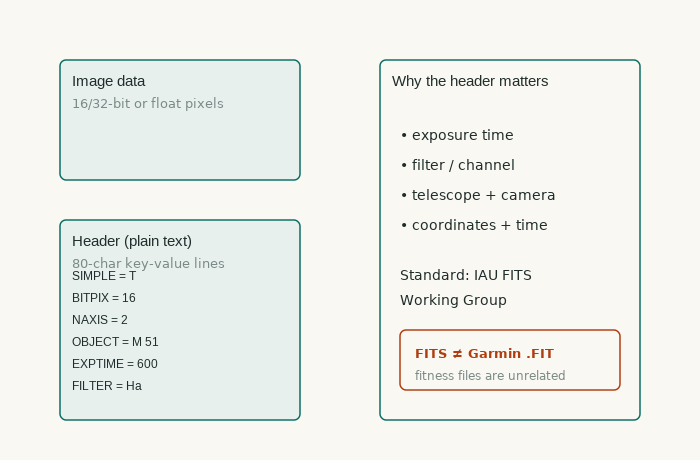
The FITS header documents the observation; the image data is the measurement.
What a FITS file is
FITS stands for Flexible Image Transport System, and it has been the standard data format in astronomy since the 1970s. Every major observatory - NASA, the European Southern Observatory, the Space Telescope Science Institute - stores and distributes its data as FITS files. If you have ever downloaded data from the Hubble or James Webb archives, you downloaded FITS files.
A FITS file is two things in one:
The header is the defining feature. A FITS file is not just a picture; it is a self-documenting record of an observation. That is why the format has survived for fifty years while image formats come and go.
The format was first standardised in 1981, and it has been maintained since by the IAU FITS Working Group, which publishes the FITS Standard that every observatory follows. The standard is deliberately conservative: it changes slowly, and backward compatibility is absolute. A FITS file written in 1990 is still readable by today's software, and today's files will be readable decades from now. That stability is exactly what a scientific community needs.
- The image data. The actual pixel values from the detector, stored at high bit depth - 16-bit or 32-bit integers, or floating point - so no precision is lost.
- The header. A block of plain-text key-value pairs describing the observation: what was observed, with what instrument, for how long, through which filter, at what coordinates, and when.
Why astronomy uses FITS instead of TIFF or PNG
Astronomers need three things that ordinary image formats do not provide:
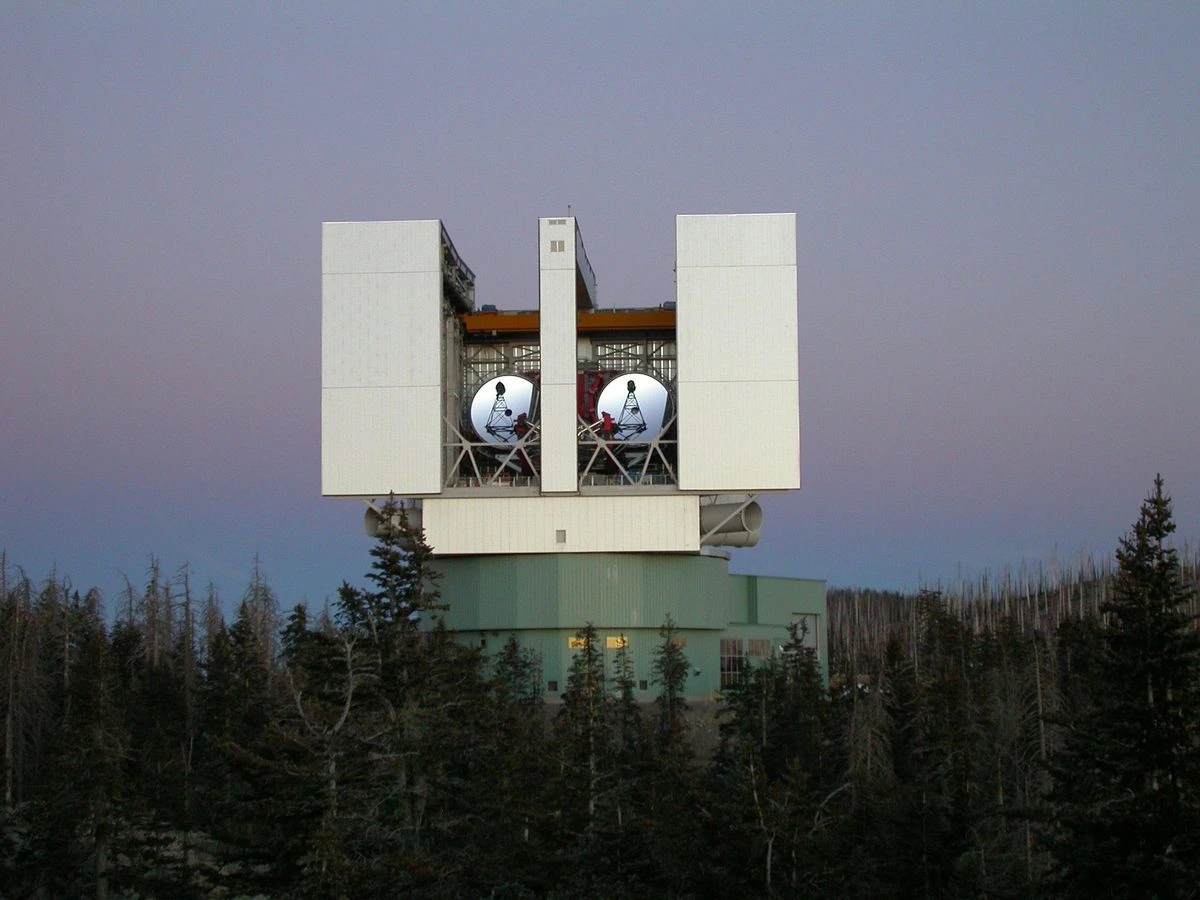
Observatory data - from telescopes like this one - travels as FITS files. Image: NASA/JPL-Caltech, public domain.
Precision. A PNG stores 8 bits per channel - 256 levels. A FITS file stores 16-bit, 32-bit or floating-point values. Astronomical images are full of subtle signal: a faint galaxy might differ from the sky background by a few counts out of tens of thousands. That information survives in FITS and is destroyed in an 8-bit format.
The header. TIFF and PNG can hold metadata, but not in the standardized, machine-readable way FITS does. Every FITS file, from any telescope in the world, describes itself with the same keyword conventions. Software can read any FITS file and know what it is without being told.
Scientific integrity. FITS files are designed to be processed, not just displayed. The pixel values are the real measurements, with the calibration data in the header. Astronomers stack, subtract, and analyze the numbers themselves - a FITS file is data, and the image you see is just one rendering of it.
The trade-off is that FITS files are not friendly to ordinary software. Your photo viewer cannot open one, and converting to JPG for sharing is a separate step. That is the gap this guide covers.
For an astrophotographer, the practical consequence is that your camera or dedicated astro camera (like a ZWO or QHY) can save FITS directly, and your processing software - Siril, PixInsight, DeepSkyStacker - expects FITS as its working format. FITS is the common language between capture and processing in astrophotography, which is why understanding it pays off.
Understanding the FITS header
The FITS header is a block of 80-character lines, each holding a keyword, a value, and an optional comment. It is plain text - you can read it in any text editor. The keywords that matter most to astrophotographers:
| Keyword | What it means | Example |
|---|---|---|
| SIMPLE | File conforms to the FITS standard | T |
| BITPIX | Bits per pixel (8, 16, 32, -32 for float, -64 for double) | 16 |
| NAXIS | Number of axes (2 for a normal image) | 2 |
| NAXIS1 / NAXIS2 | Pixels along each axis (width, height) | 2048 / 2048 |
| OBJECT | The target observed | M 51 |
| DATE-OBS | Date and time the observation started (UTC) | 2026-03-14T02:31:07 |
| EXPTIME | Exposure time in seconds | 600 |
| FILTER | Filter used (R, G, B, Ha, OIII, ...) | Ha |
| TELESCOP | Telescope used | Celestron C11 |
| INSTRUME | Camera or instrument | ASI2600MM |
The header is governed by the FITS Standard, maintained by the IAU FITS Working Group. The standard defines which keywords are mandatory (SIMPLE, BITPIX, NAXIS, and the axis sizes) and how the rest are formatted, so every FITS file from every instrument speaks the same language.
For an astrophotographer, the header is where the useful information lives: the exposure time tells you if a sub-frame is usable, the filter tells you which channel you are looking at, and DATE-OBS tells you when it was taken. Reading the header is often more informative than looking at the image.
Two more keywords are worth knowing even though they are not always present: BSCALE and BZERO, which together define how the stored integer values map to real brightness values, and MJD-OBS, the observation date as a Modified Julian Date - a single number astronomers use for precise timing. If you see BSCALE and BZERO in a header, the file's pixel values are scaled, and software that ignores them will display the image incorrectly.
FITS is not Garmin .FIT: clearing up the confusion
This confusion is real and worth clearing up, because the two formats genuinely collide in search and in file managers.
FITS (Flexible Image Transport System) is the astronomy format described in this guide. Files end in .fits or .fit.
FIT (also written .fit) is the file extension Garmin and other fitness devices use for activity files - GPS tracks, heart rate, pace. Files end in .fit.
The extensions are nearly identical, the formats have nothing in common, and the confusion is compounded by the fact that some astronomy software accepts .fit as a short form of .fits. If you search for a "fits file viewer" you will find fitness apps; if you search for "fit file viewer" you will find astronomy tools. Both searches are wrong half the time.
How to tell them apart: open the file in a text editor or hex viewer. A FITS file starts with the ASCII text SIMPLE =. A Garmin FIT file starts with a 12-byte header beginning with a length byte and the ASCII text .FIT. One look at the first line settles it.
The collision matters in practice because both communities search for the same words. An astrophotographer searching for a way to open their camera's files will find fitness apps, and a runner searching for their activity files will find astronomy software. If a search result looks wrong for your file type, check the first bytes before downloading anything - it will save you a wasted install.
Opening a FITS file: desktop options
The standard desktop tools, all free:
SAOImageDS9. The professional standard for viewing FITS images. It handles huge files, multiple extensions, and the scaling modes astronomers need (linear, log, zscale). It is the tool most observatories use.
Astropy. The Python library for astronomy. If you work with FITS data programmatically, astropy.io.fits is the standard way to read headers and data. A few lines of Python can print the entire header of any FITS file.
AstroImageJ. A version of ImageJ built for astronomy, popular for photometry and image calibration. It opens FITS natively.
FITS Liberator. A plugin for Photoshop and other image editors that converts FITS data into a viewable image with proper scaling. Useful when you want to process an astro image in a normal editor.
Siril. A free astrophotography processing suite that opens FITS and handles the full calibration-stacking workflow. Increasingly the standard for amateur astrophotographers.
If you are just starting out, Siril is the most practical first choice: it is free, it is built for the amateur workflow (calibration, stacking, post-processing), and it reads FITS natively. DS9 is the professional standard but has a steeper learning curve; Astropy is the right tool if you want to script your processing rather than click through it.
Viewing a FITS file in your browser
If you just want to see what is in a FITS file - check a sub-frame, read the header, look at a download from an archive - a browser viewer is the fastest path. FileViewerHub's FITS viewer renders the image plane and shows the full header as a readable key-value table, entirely on your device. Nothing is uploaded.
The viewer supports 16-bit and 32-bit images with basic scaling (linear, log, zscale), which covers the vast majority of astrophotography files. Multi-extension FITS files - where a single file contains several images or tables - are handled with an HDU selector, or the limitation is stated clearly.
The honest limitation: a browser viewer is for viewing and inspecting, not for processing. Calibration, stacking and analysis still belong in Siril, DS9 or Astropy. But for the common question - "what is in this file, and what does the header say?" - a browser viewer answers it in seconds.
Working with multi-extension FITS
A FITS file can contain more than one data structure. Each structure is called an HDU (Header/Data Unit), and a file with several is a multi-extension FITS (MEF) file.
The first HDU is the primary - usually the main image. Additional HDUs can hold more images, or binary tables of data (source catalogs, spectra, event lists). Space telescope data is often distributed this way: one file containing the science image, the error array, and a table of detected sources.
When you open a multi-extension FITS file, the tool should let you choose which HDU to view, or at least tell you how many there are. If a viewer shows only the first image, you may be missing the interesting data in the extensions. The HDU count and each HDU's type are listed in the file's header structure.
For astrophotographers, multi-extension files appear most often when downloading data from professional archives - a Hubble or JWST download is typically a single FITS file containing the science image, the error array, and a table of detected sources. Knowing that the file holds more than one image is the difference between seeing one picture and finding the real data.
FAQ
What is a FITS file?
A FITS file (Flexible Image Transport System) is the standard image format used in astronomy. It stores high-precision image data plus a plain-text header describing the observation - exposure time, filter, telescope, coordinates and timestamp.
What does FITS stand for?
Flexible Image Transport System. It is the data format standard used by astronomy since the 1970s, maintained by the IAU FITS Working Group.
What is in a FITS header?
A block of plain-text key-value pairs describing the observation: SIMPLE, BITPIX, NAXIS, OBJECT, DATE-OBS, EXPTIME, FILTER, TELESCOP, INSTRUME and more. The header is often more valuable than the image itself.
Is FITS the same as a Garmin FIT file?
No. FITS is the astronomy format. FIT is the extension Garmin fitness devices use for activity files. They are unrelated formats with nearly identical extensions. A FITS file starts with "SIMPLE =" in plain text; a Garmin FIT file starts with a binary header containing ".FIT".
What software opens FITS files?
SAOImageDS9, AstroImageJ, Siril, and Astropy for programmatic access. FITS Liberator converts FITS to viewable images for Photoshop. Browser-based viewers can display the image and header without installing anything.
Can I convert FITS to JPG?
Yes, but you lose the scientific data - a JPG is an 8-bit rendering, while the FITS file holds 16-bit or floating-point values plus the header. Convert for sharing, keep the FITS as the master.
Want more file-format guides? Browse all FileViewerHub guides - practical answers, no jargon.