A PSB file is Photoshop's Large Document format - the same layered structure as a PSD, but built for files that exceed PSD's limits of 30,000 pixels per side or 2GB in size. Designers use it for huge canvases like billboards, panoramas and detailed matte paintings. Opening one without Photoshop is possible, though most tools show only the flattened image rather than editable layers.
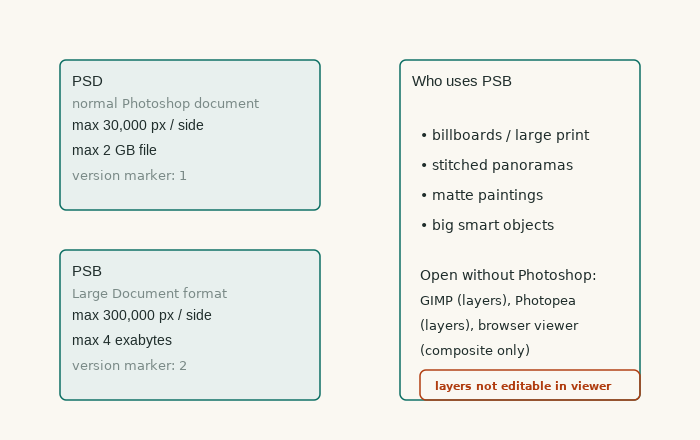
PSD and PSB support the same features; only the size limits differ.
What a PSB file is
PSB stands for Photoshop Large Document (the format's official name in Adobe's specification is "Large Document Format"). It is Photoshop's native file format for very large images, and it is structurally almost identical to PSD - the same layers, masks, adjustment layers, smart objects and channels - with one difference: the size limits are far larger.
The format was introduced with Photoshop CS in 2003, and it exists for a simple reason: PSD files have hard limits, and professional work regularly exceeds them. When a document is too large for PSD, Photoshop automatically offers PSB instead.
The file header of a PSB is the same 8BPS signature as a PSD, with a version marker of 2 (PSD is version 1). Everything after that is the same structure, just with wider fields to hold the larger dimensions.
A common misconception is that PSB is a "bigger PSD" in the sense of more features. It is not - the two formats support the same Photoshop features. The only difference is the size envelope. A file that fits within PSD's limits can be saved as either; a file beyond them can only be PSB.
PSB vs PSD: the actual limits
The difference between the two formats is entirely about limits:
| PSD | PSB | |
|---|---|---|
| Maximum dimension | 30,000 pixels per side | 300,000 pixels per side |
| Maximum file size | 2 GB | 4 exabytes (4.2 billion GB) |
| Version marker | 1 | 2 |
| Layers, masks, smart objects | Yes | Yes |
| Compatibility | Widely supported | Photoshop and a few other tools only |
The 30,000-pixel and 2GB limits are the whole reason PSB exists. A billboard design at 300 DPI, a stitched panorama, or a matte painting with hundreds of layers will blow past one or both of those numbers, and PSD simply cannot save it. Photoshop detects this and switches to PSB automatically.
The practical consequence of the larger limits: PSB files are usually enormous, and they are much less portable than PSDs. Most software that opens PSD does not open PSB, because the format's wider fields are not implemented everywhere.
It is also worth knowing that the 2GB PSD limit is a hard file-size ceiling, not a recommendation. A PSD with hundreds of layers can hit 2GB well before the pixel limits, and the same is true in reverse: a 25,000-pixel-wide panorama with few layers can exceed 2GB of file size while staying under the pixel limit. Either way, Photoshop switches to PSB.
Why designers use PSB
Designers reach for PSB in a handful of situations:

Billboard-scale artwork is exactly the job PSB was built for. Photo by Schill, CC BY 2.0.
The common thread is size: PSB is what Photoshop uses when a document is too big for the normal format. If you receive a PSB, the person who sent it was working at a scale that most software cannot handle.
One more common source of PSBs is worth naming: smart objects. When you double-click a smart object in Photoshop, the object's contents open as a separate document - and if that document is large, Photoshop saves it as a PSB automatically. This is why designers sometimes find PSB files appearing in their folders without ever choosing the format themselves.
- Billboards and large-format print. A 48-sheet billboard at print resolution is far beyond 30,000 pixels. PSB is the only Photoshop format that can hold it.
- Stitched panoramas. Merging dozens of high-resolution frames produces a canvas that exceeds PSD's limits.
- Matte paintings and concept art. These are built at very high resolution with hundreds of layers, and the layer count alone can push the file past 2GB.
- Smart object workflows. When a smart object's contents are edited, Photoshop renders them as a separate document - and if that document is large, it is saved as a PSB automatically.
How to open a PSB without Photoshop
Opening a PSB without Photoshop is possible, but with an important caveat: most tools can display the flattened composite image, and only a few can edit the layers.
In your browser. FileViewerHub's PSB viewer renders the flattened composite preview that Photoshop embeds in the file, entirely on your device - nothing is uploaded. This is the fastest way to see what is in a PSB when you do not have Photoshop. The honest limitation: it shows the composite image, not editable layers.
With GIMP. GIMP opens PSB files, including their layers, in recent versions. It is free, and it is the most capable free desktop option for actually working with a PSB. Very large files will use a lot of RAM, so give it a machine with plenty of memory.
With Photopea. Photopea is a free browser-based editor that opens PSD and PSB files with layer support. It runs entirely in the browser and needs no installation. Like GIMP, it works in RAM, so extremely large PSBs may be slow or fail to open.
With a file converter. Online converters can turn a PSB into a PSD or PNG, but they usually flatten the layers in the process, and uploading a multi-gigabyte design file to a random converter is a privacy risk. Prefer tools that process locally.
The practical rule: if you just need to see the image, use a viewer. If you need to edit, use GIMP or Photopea. If you need the full Photoshop experience, there is no free substitute - the honest answer is that PSB's layer editing is a Photoshop capability.
One thing to check before opening any PSB: how large it actually is. A multi-gigabyte PSB will strain any free editor, and knowing the file size in advance tells you whether to expect a slow open or a failed one. File managers show the size before you open the file, so a quick look saves you a long wait.
Free desktop options: GIMP and Photopea
GIMP and Photopea are the two free options worth naming, and they are different tools.
GIMP is a full desktop image editor, free and open source, available for Windows, macOS and Linux. Recent versions open PSB files with layers, and GIMP can also save to PSD. Its limits are practical rather than format-based: a multi-gigabyte PSB with hundreds of layers will strain any machine, and GIMP's layer features do not cover every Photoshop-specific effect.
Photopea is a browser-based editor that looks and behaves like Photoshop, supports PSD and PSB, and needs no installation or account. It is remarkably capable for a browser app, and it is the fastest way to open a PSB on a machine where you cannot install software. The same RAM caveat applies: it processes files in memory, so very large documents may be slow.
Both are genuinely useful, and both have the same honest limitation: they are not Photoshop. Exotic layer effects, smart object behaviour and some blend modes may not render identically. For most viewing and basic editing, they are more than enough.
Viewing a PSB in your browser
If you just need to see what is in a PSB - a client checking a designer's file, a colleague reviewing a layout - the fastest path is to view a PSB in your browser with FileViewerHub. The viewer reads the flattened composite preview embedded in the file and displays it on your device, with no upload and no installation.
This works because Photoshop always stores a flattened composite in the file alongside the layer data. A viewer reads that composite and ignores the layer structure, which is why it can display a multi-gigabyte PSB quickly.
The limitation to state plainly: you see the finished composite, not the layers. If the file was saved with a hidden layer that changes the design, you will not see it. For review purposes that is usually fine; for editing, you need GIMP, Photopea or Photoshop.
What you lose when you open a PSB outside Photoshop
Being honest about the trade-offs matters, because this audience is technical and unforgiving:
The limitations matter most when you have to send the file onward: a flattened JPG or PNG export loses the layered structure, and other Adobe formats have their own quirks too. For reviewing and sharing, the composite is what everyone actually sees anyway.
The decision table is simple: need to check what the file contains? A viewer answers in seconds. Need to change something? GIMP or Photopea. Need every layer effect, smart object and blend mode to behave exactly as the designer intended? Photoshop. Most people who receive a PSB fall into the first category, and a viewer is the right tool for them.
- Editable layers. GIMP and Photopea can edit layers; browser viewers cannot. Neither reproduces every Photoshop layer feature perfectly.
- Smart objects. These are Photoshop-specific. Outside Photoshop, a smart object is usually flattened or rendered as a plain layer.
- Adjustment layers and blend modes. Most render approximately; some exotic modes differ.
- Huge files. A PSB near the format's limits is a multi-gigabyte file that must fit in RAM to be edited. Browser viewers avoid this by reading only the composite, which is why they handle large files better than editors do.
FAQ
What is a PSB file?
A PSB file is Photoshop's Large Document format - the same layered structure as a PSD, but built for files that exceed PSD's limits of 30,000 pixels per side or 2GB in size.
What is the difference between PSB and PSD?
PSD is limited to 30,000 pixels per side and 2GB. PSB supports up to 300,000 pixels per side and vastly larger file sizes. Both hold the same Photoshop features; PSB is for documents too large for PSD.
Can I open a PSB without Photoshop?
Yes. GIMP and Photopea open PSB files with layer support, and browser-based viewers display the flattened composite image. Full layer editing with every Photoshop feature still requires Photoshop.
Can I convert PSB to PSD?
Only if the file fits within PSD's limits - 30,000 pixels per side and 2GB. If it does, GIMP or Photopea can save it as a PSD. If it does not, the file is too large for the PSD format by definition.
Why is my PSB file so large?
PSB is used for very large documents - billboards, panoramas, matte paintings - and the file stores every layer, mask and channel at full resolution. Multi-gigabyte PSBs are normal.
Does GIMP open PSB files?
Yes. Recent versions of GIMP open PSB files with layers. Very large files use a lot of RAM, so editing a multi-gigabyte PSB needs a machine with plenty of memory.